
I’m going to write about some little (and big) tweaks that I have tackled either in my free time or in the course solving customer problems here at TrackAbout to improve our code and our development experience. These will range all over the map, and you’ll see that I don’t know all that much, but I love to learn enough to fix things up a bit.
Since starting at TrackAbout much of my time has been spent on the .NET version of our TrackAbout mobile app. One thing that quickly started to annoy me was small gaps on the right side of the DataGrids. Many of the different workflows in this app include grids of data, often listing assets or other information. But every one of these screens had a gap on the right side. It made the screen look bad, it wasted valuable pixels on these small screens, and it offended my (admittedly limited) design sensibilities.
Let’s Play “Find the Gap”
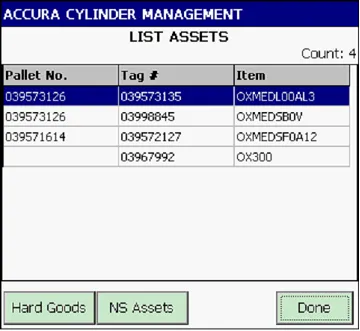
As I worked with a few of these screens I quickly learned that we had a common algorithm for making sure that, whenever the screen size changed, the columns would resize to fit the width of the grid. Although the algorithm for column resizing was common to all the DataGrids, the code was not. It was re-implemented for every screen that had a DataGrid. It was slightly changed depending on the number of columns or the desired relative widths of the columns. It was obvious that it had been written up quickly for the first DataGrid one afternoon, forgotten, and then copied around whenever someone made a new screen with a DataGrid on it. If necessary, they made minor tweaks to the code to make it work with this specific set of columns. So each of the implementations was slightly different.
Most importantly, none of them eliminated the gap. Every single DataGrid had an annoying gap on the right side because the algorithm was not correct. Although over time the different implementations had diverged somewhat, not a single one did the right thing.
What was the code trying to do?
The gap was actually hard-coded into the code, and it was an attempt to make sure horizontal scrollbars didn’t show up. If the algorithm were ever to make the combined width of the columns greater than the width of the DataGrid, a horizontal scrollbar would appear, so there was a magic number right in the middle of it all to force the columns to use less space. But because the algorithm itself didn’t use all the right window metrics and properly handle the different platforms that the code ran on, the only way to get the magic number work was to make it too big. And so in 99% of the cases, there was a 1-12 pixel gap on the right of the grid.
A simple algorithm looked like this:
That LAST_COL_MARGIN was trying to cover a few things: the widths of the borders, the widths of the column dividers, how those widths grow in high-DPI mode (which happens on Windows Mobile, but not on Windows CE). Additionally, hiding the horizontal scrollbar happened automatically if you got the columns within the width allowed, so the code in lines 7-9 was just an admission that the rest of the algorithm was wrong.
Some implementations with two columns replace line 15 with the following (notice the unnamed magic number 6):
And for an arbitrary number of columns (see if you can spot the bug in this code that adds to the gap):
I’ll spare you all the other 10 or 15 different implementations.
How do we fix it?
Rationalizing all this took some time. The first step was fairly simple - I created a canonical place for the column sizing algorithm. We already used a custom subclass of the DataGrid, so that was the obvious place. Next, I made it work with the simplest possible instance of the algorithm (single column). That was easy to extend to multiple, equally weighted columns. As these were added, I removed the old code and called into the new algorithm, testing as I went. I also had to add handlers for weighting columns differently and for setting fixed-width columns.
The real challenge along the way was getting this new code right. That meant I had to figure out what metrics mattered (DataGrid borders, DataGrid column dividers, and platform DPI setting) and figure out what their values were across the three platforms we use (Windows Mobile, Windows CE, and Win32). Initially, I did not know that Windows CE and Windows Mobile had different window metrics, and only realized it when QA found the issues. Figuring out those metrics on Windows CE devices was the trickiest of all, which I’ll document in another blog post. There was one last quirk around resizing the columns - doing so could change the visibility of both horizontal and vertical scrollbars, which would then require a second run of the resizing code.
So here is the final code, which allowed for both weighted columns and fixed-width columns:
One thing I cannot show you easily is that this block of code replaced hundreds of lines of duplicate code across tens of files. I can assure you that that was a satisfying checkin to make.
Finished!

When it was all done, both the code and the UI were much more beautiful. Users would have a little more screen real estate devoted to actual information, which is important on small mobile screens. And because every single DataGrid used the new code, lazy coders—like me—who copied and pasted to create new screens with DataGrids would pick it up automatically.